MCP-native trading journal
TradeMan is the journal your model can actually read. Log multi-fill trades, import brokers, then connect Claude, Cursor, or any MCP client and review expectancy against your real book — not a chat transcript. The journal is free; MCP is the paid add-on.

Analytics, filters, and broker import stay first-class. Model Context Protocol (MCP) lets an assistant list trades, write recaps, and ask what actually worked — against fills you already logged.

Plot fills on interactive charts, filter for edge, then hand the same data to an assistant over MCP. Recaps and reviews live on the trade — not in a side chat you will lose.
Ask what worked last week. The model sees your journal, not a paste of screenshots.
Drill into setups, sessions, and outcomes — then ask the same questions through MCP tools.
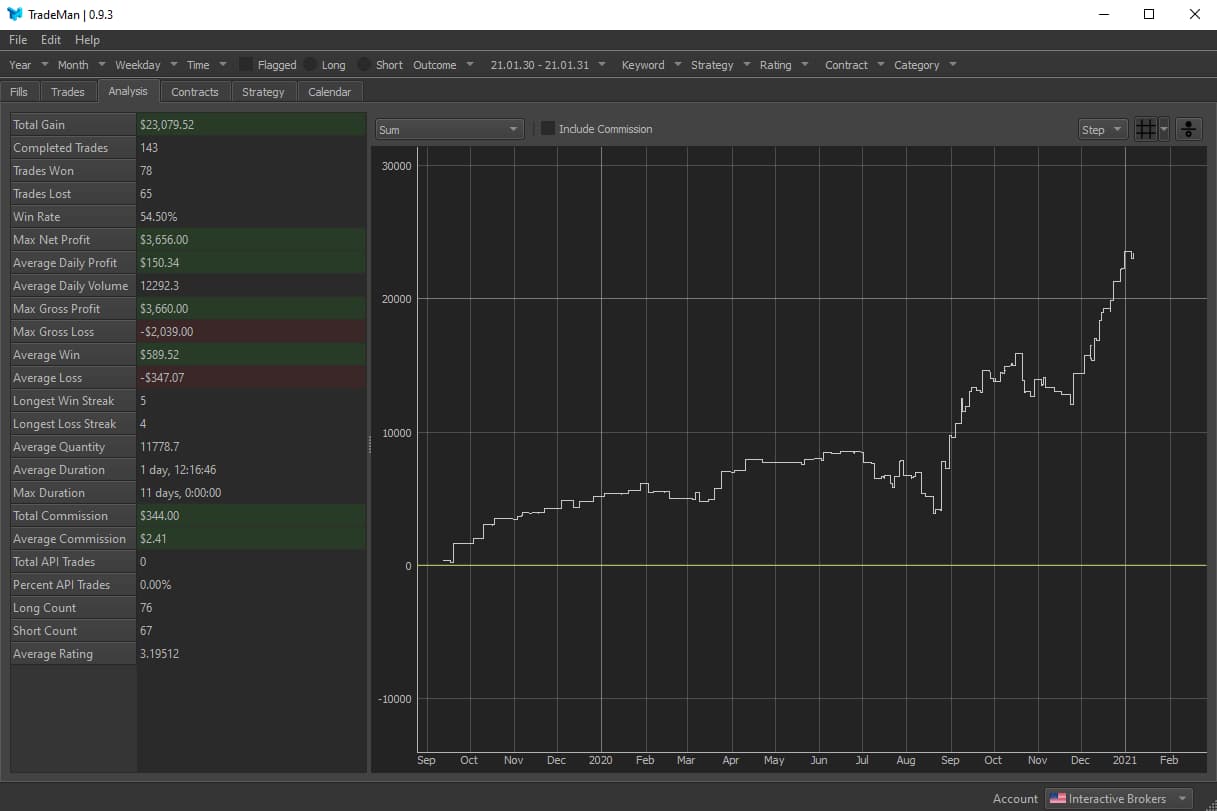
See expectancy, equity, and price action in the app; cite the same trades from an AI client.

Import brokers, group multi-fill trades, write daily recaps — then connect Claude, Cursor, or any MCP client with a personal key.
Streamable HTTP at /mcp. List trades, search notes, upsert a daily journal, set a review, pull analysis.
Scale in and out. TradeMan groups fills and computes volume-weighted entry, exit, and PnL.
Pull Interactive Brokers Flex or exchange history, then link instruments to your catalog.
Model Context Protocol
TradeMan is not a chatbot bolted onto a spreadsheet. It is a production journal with an MCP route, so an assistant can query and write against your fills, notes, and daily recaps — scoped to your account, never someone else's.
The journal is free. MCP is the paid add-on. After Polar checkout, Settings → AI access mints a hashed key. Shown once. Revoke anytime.
Add https://open.trademan.app/mcp with Authorization: Bearer tm_…. Works with Claude, Cursor, and any streamable-HTTP MCP client.
List trades, search notes, upsert a daily recap, set a review, or pull analysis — the same journal you use in the UI.
{
"mcpServers": {
"trademan": {
"url": "https://open.trademan.app/mcp",
"headers": {
"Authorization": "Bearer tm_…"
}
}
}
}
You journal fills in TradeMan as usual. Then you connect an AI client over Model Context Protocol (MCP). The assistant can list trades, search notes, write daily recaps, and pull analysis — against your account, not a generic chat.
The journal is free. MCP is a Polar subscription. After you subscribe, Settings → AI access creates a personal API key. Point your client at https://open.trademan.app/mcp with Authorization: Bearer tm_…. Claude, Cursor, and other streamable-HTTP MCP clients work. Revoke the key anytime.
Absolutely. TradeMan models a trade as many fills (scale-in / scale-out) and derives PnL, bias, and outcome from those fills.
Yes. Import IB Flex Query XML or pull Flex Web Service — fills are normalized, de-duplicated, and auto-grouped into round-trip trades. Exchange history via CCXT-compatible connections is also supported.
TradeMan is a production trading journal with MCP for AI review. We also publish free learn guides (adapted from TradeStart) on trading education, educators, resources, and expectancy — then you measure results in the journal.
If you're unhappy with your purchase for any reason, email us within 90 days and we'll refund you in full, no questions asked.
It's a portmanteau of 'Trade Manager'.
AI-assisted journal · MCP · TradeStart education
There is an overwhelming amount of trading information on the internet. New blog posts and video tutorials appear every day. The challenge is not finding information — it is separating signal from noise, then proving what works in your account.
TradeMan is a journal for AI-assisted trading: multi-fill trades, Interactive Brokers Flex and CCXT import, contracts across stocks, futures, forex, and crypto, plus an MCP server so Claude, Cursor, or any compatible client can review the same book. Education from the TradeStart library still pairs with a journal that makes expectancy measurable.
Explore free guides on trading education, how to choose trading educators, resource checklists, and tool concepts like positive expectancy and random-walk simulation — then open the app, log every fill, and connect MCP.

The journal is free. Subscribe for MCP when you want an AI client on the same book.